
Passwordless login to client PCs for Guest Users
The MyPC Public Library Client can operate in a passwordless mode. To understand how this setup works and to configure it correctly, please contact our support team.
If you are using Guest users and want to enable a passwordless login experience on client machines, speak to our support team on the changes required on the client and then follow the steps below:
Steps to Enable Passwordless Guest Login to MyPC Clients
- Log in as a Super Admin or Owner
- Navigate to:
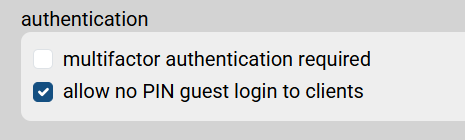
Admin → Organisation → advanced options → authentication - Enable the following setting:
“allow no PIN guest login to clients”
Important Notes
- Guest users will still be required to log in to the web interface using their auto-generated password.
- The passwordless experience applies only to client machine logins, not web access.